


5 Most Effective and Reliable Ways to Download Playlist from YouTube and YouTube Music
Struggling to download a full YouTube playlist without errors or limits?
You’re not alone. Many tools may fail midway or restrict quantity or quality. So what’s the safest, fastest, and most reliable way to save an entire playlist from YouTube? This guide walks you through the best free and paid options, so you can download playlist from YouTube or YouTube Music with confidence.
- • Part 1: The Critical Criteria to Choose a YouTube Playlist Downloader
- • Part 2: Best 5 Ways to Download YouTube Playlist on PC/Mac
- #1 Any Video Converter
- #2 4K Video Downloader
- #3 Wondershare UniConverter
- #4 YouTube Multi Downloader
- #5 TunePat YouTube Music Converter
- • Part 3: FAQs about YouTube Playlist Download
Part 1: The Critical Criteria to Choose a YouTube Playlist Downloader
Choosing the right YouTube playlist downloader, one that truly meets your needs, can solve your download tasks once and for all. You won’t need to pay for extra tools or keep a backup option on hand. Let’s walk through how to pick the best one.
✅ YouTube Playlist Downloader Checklist: The Bare Essentials
✔ Safety Standards
- Clean installer
- No ads or bundled adware
✔ Strong Privacy Protection
- Desktop processing preferred
- All downloads handled locally
- Reduced risk of data leaks
✔ No Quantity Limits
- Download full playlists or channels
- No restrictions on file count
✔ Stability and Success Rate
- Stability with long playlists (100+ videos)
- No failures/crashes during the whole playlist downloading
✔ High-Quality Output
- Supports 8K, 4K, and HDR
- Preserves the original audio quality
- The trade-off between quality and file size
Broad Format Support
- MP4 (H.264), MKV, MP3, WAV, AAC, FLAC
- Ensures compatibility across devices
*Note: Many YouTube videos are coded in VP9 or AV1. Without converting to H.264, some devices may not play the downloaded file.
✔ Efficient Batch Downloads
- Download entire playlists at once
- Support simultaneous downloads
- Support GPU acceleration
*Tips: 3–5 simultaneous tasks is usually the safest and most stable range.
✔ Trusted, Reliable Source
- Established developer, like Any Video Converter, 4K Video Downloader
- Frequent updates
- Regular bug fixes and improvements
⭐ YouTube Playlist Downloader Bonus: The Icing on the Cake
✔ Metadata Preservation
- Keeps titles, track numbers, and playlist order, essential for YouTube Music collections
✔ YouTube Music Support
- Ensures you can download audio at the best quality available from YouTube Music
✔ Playlist Organization
- Organizes your playlist downloads in the correct sequence, without extra steps
- Automatically create a subfolder to save each playlist
✔ Subtitle and Audio Track Selection
- Let you choose the exact subtitle file or audio track you want before downloading
✔ Built-In Web Browser
- Search, preview, and add videos directly inside the tool.
✔ On-Demand Playlist Downloads
- Download only the files you need rather than the entire playlist
Part 2: Best 5 Ways to Download YouTube Playlist on PC/Mac
Based on the essential and advanced criteria, you can quickly determine which tool is the best fit and get it right the first time. To save you even more time, we thoroughly vetted dozens of options and narrowed the list down to five strong finalists, making it easy for you to choose with confidence.
Method 1: Best Free Way to Download YouTube Playlist on PC/Mac
#1 Any Video Converter
Some people say there’s no such thing as a free lunch, but Any Video Converter comes close. It gives free users access to most essential features with minimal limitations. In many ways, it’s a hidden gem.
When it comes to downloading YouTube playlists, Any Video Converter not only checks every box on the essentials list but also delivers advanced features that genuinely stand out.
YouTube Playlist Downloader Essentials: ✅ Ticks all the boxes
YouTube Playlist Downloader Bonus Features (Advanced): ⭐
- Download both videos and audio from 1,000+ sites
- Custom mode lets you save up to 5 personalized presets
- Compact or Balanced mode to achieve the quality–size trade-off
- Enjoy full support for Premium and YouTube Music
- Parse an entire playlist at once or individually
- Select specific files from a playlist to download
- Select multiple/specific subtitles or audio tracks as needed

How to Download YouTube Playlist for Free with Any Video Converter
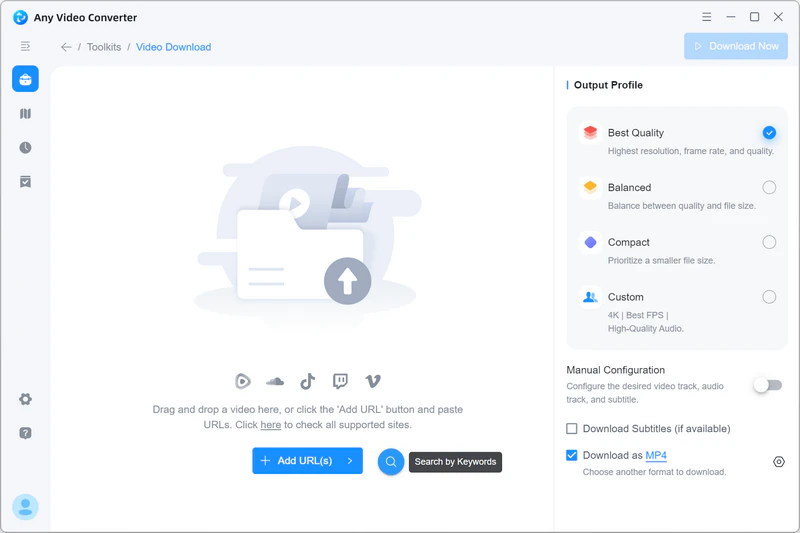
Step 1: Add the Playlist URL
Open the 'Download Video' tool in Any Video Converter.
Copy the YouTube playlist link, and wait for the playlist to be parsed.
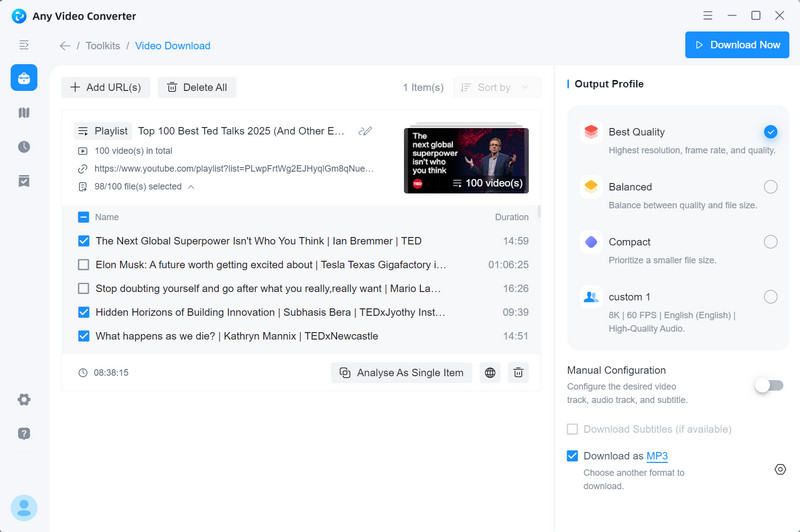
Once parsed, expand the list to select individual files or simply check all items to download everything at once.
Tips: You can also click the ' ' icon to use the built-in browser, search for the playlist, and add it directly to your parsing list.
Step 2: Choose the Download Quality
Any Video Converter offers three quality modes: Best Quality, Balanced, and Compact.
Select the one that fits your needs for size, speed, or quality.
Step 3: Download the Playlist
Click 'Download Now' to start downloading the full playlist instantly.
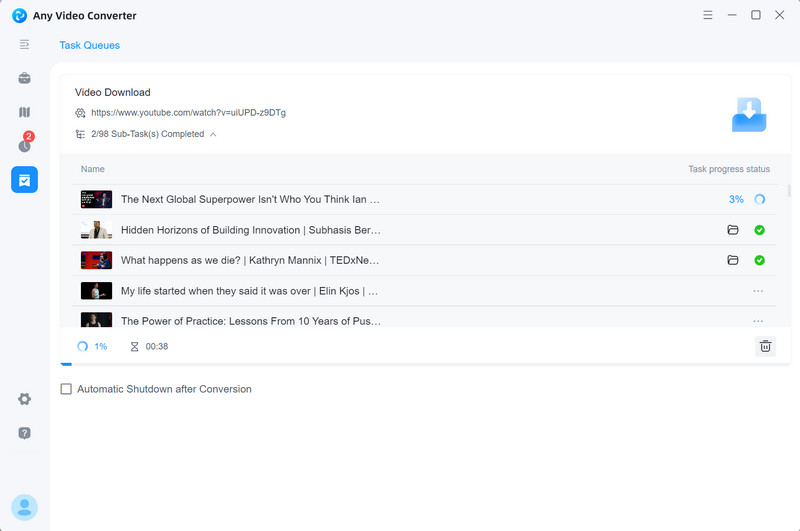
When it’s done, switch to the 'History' tab to review file details and access your downloads.
Method 2: Best 3 Paid Ways to Download YouTube Playlist to PC/Mac
Although Any Video Converter offers the best value for most users, we also selected a few paid alternatives. These options deliver good performance and reliable YouTube playlist downloading, giving you more great choices to consider.
#2 4K Video Downloader
When it comes to downloading, especially full playlists, both Any Video Converter and 4K Video Downloader deliver top-tier performance. They’re fast, reliable, and hard to beat on the essentials. The real difference shows up in the advanced features.
YouTube Playlist Downloader Essentials: ✅ Ticks all the boxes
YouTube Playlist Downloader Bonus Features (Advanced): ⭐
- Smart mode, similar to the Custom mode of Any Video Converter
- Subscribe to the playlist to auto-download the new videos
- Numerate files in playlists and channels downloads
- Also support for Premium and YouTube Music
- Pause and resume the downloads
How to Download YouTube Playlist with 4K Video Downloader
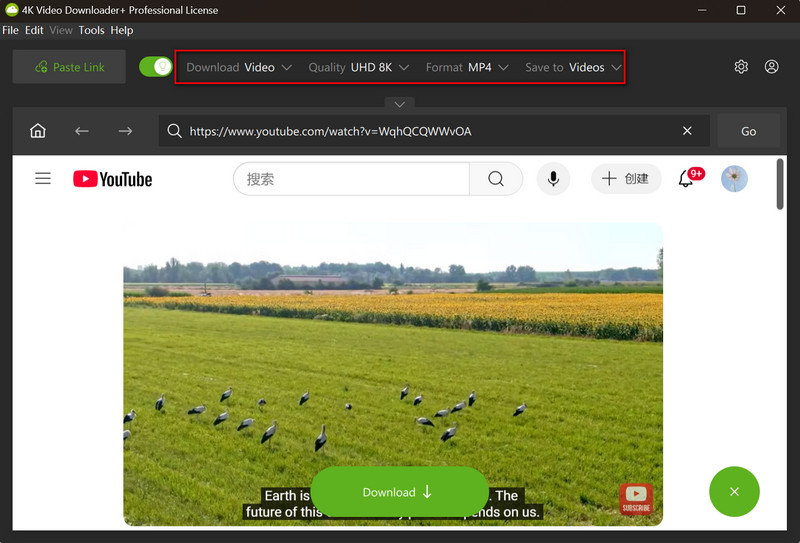
Step 1: Enable the Smart Mode
At the top menu bar of 4K Video Downloader, enable the Smart mode and choose the download type as video or audio, download quality, format, and save location.
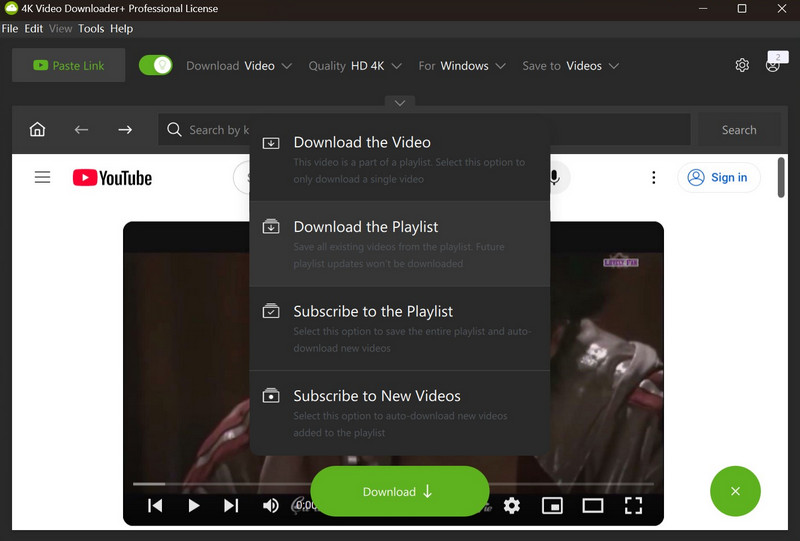
Step 2: Add the Playlist URL
Copy the link of a YouTube playlist and click 'Paste Link' in 4K Video Downloader, then select 'Download the Playlist'.
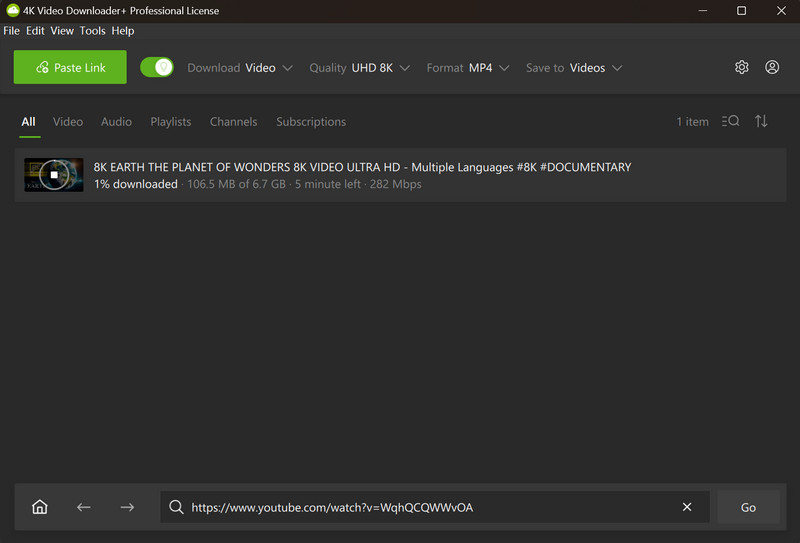
Step 3: Start Downloading YouTube Playlist
The program starts retrieving the information, and then the downloading process will start automatically.
#3 Wondershare UniConverter
Through our evaluation, Wondershare UniConverter also meets all the essential requirements for a YouTube playlist downloader, and adds a few extra features that make the experience even better.
YouTube Playlist Downloader Essentials: ✅ Ticks all the boxes
YouTube Playlist Downloader Bonus Features (Advanced): ⭐
- Subscribe to the playlist to auto-download the new videos
- Pause and resume the downloads
- Auto-resume the unfinished task on startup
How to Download YouTube Playlist with Wondershare UniConverter
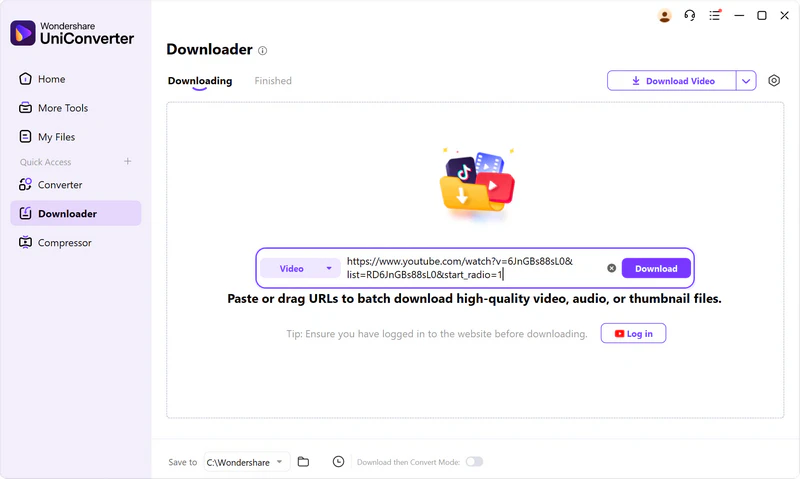
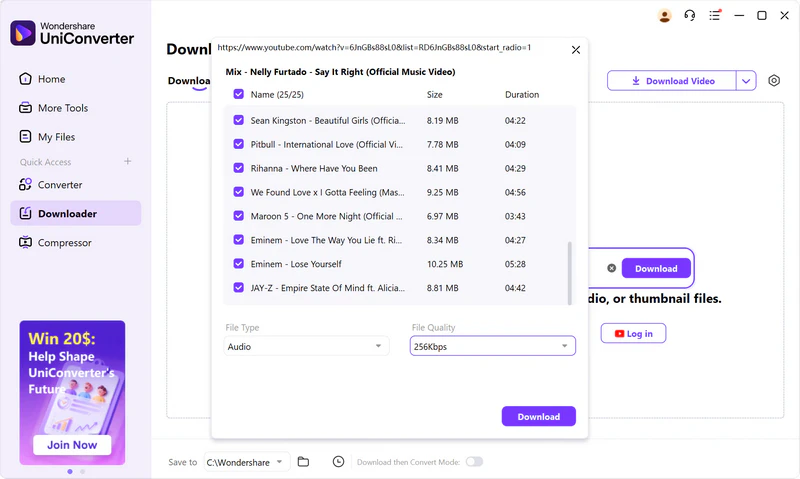
Step 1: Paste the Playlist URL
Open the Download tool in Wondershare UniConverter, then paste the playlist URL in the search box.
Step 2: Select File Type and Quality
Click the "Download" button to initiate the analysis of the playlist. After successful analysis, you can choose the file type as video or audio, and select the output quality.
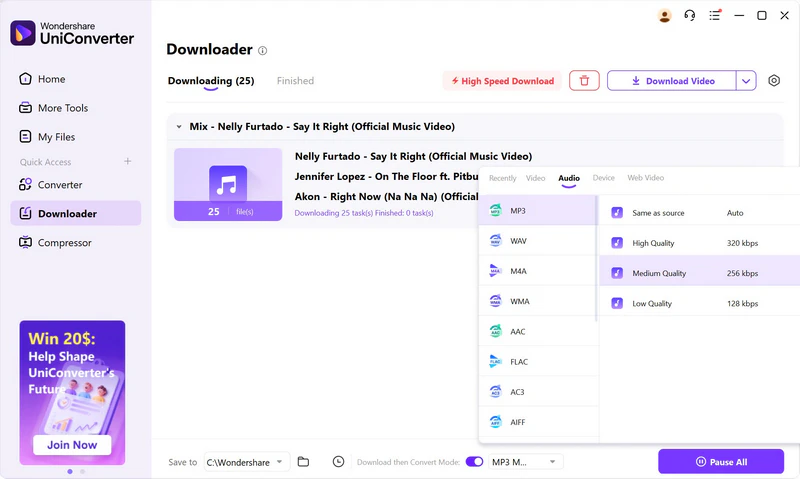
Step 3: Start Downloading and Converting YouTube Playlist
Click the "Download" button again to start downloading the playlist as audio files.
Method 3: Best Free Way to Download YouTube Playlist Online
#4 YouTube Multi Downloader
Online downloaders rarely handle YouTube playlists as well as expected. Some can parse a playlist, but then push you to install a desktop app to download the full list. If you specifically need an online solution, YouTube Multi Downloader is still a working one.
That said, it comes with typical online limits. Bulk downloading may be restricted, loading slowly, and it may not always detect every item in large playlists (for example, only 50 out of 100).
How to Download YouTube Playlist Online for Free
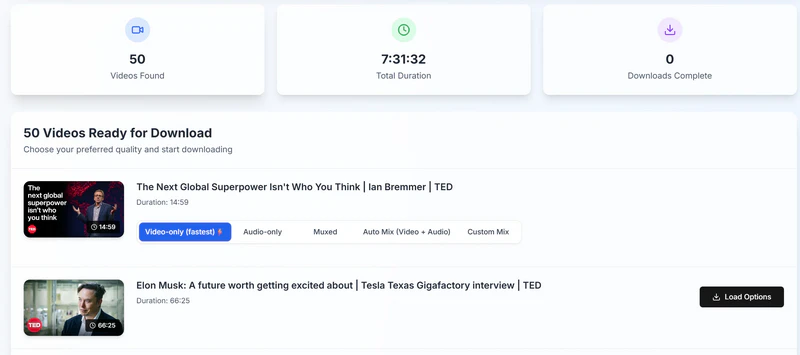
Step 1: Copy the playlist link from YouTube, then paste it into the input box.
Step 2: Click 'Fetch Video Details' and you’ll see the playlist’s total items and duration.
Step 3: For each item, click 'Load Options' to view available quality options. Choose your preferred quality, then start the download.
Method 4: Best Way to Download Playlist from YouTube Music
#5 TunePat YouTube Music Converter
Although Any Video Converter and 4K Video Downloader can download high-quality audio from YouTube Premium and YouTube Music, they don’t preserve full metadata and ID3 tags, such as title, artist, album, artwork, and year. If keeping tags matters to you, TunePat YouTube Music Converter is a stronger choice.
The unique features of downloading a playlist from YouTube Music:
- Support more audio output formats, like MP3, AAC, WAV, FLAC, AIFF, or ALAC
- Preserve ID3 tags, lyrics, and original audio quality
- Free toolbox to burn music to CD, edit ID3 Tags, etc
How to Download Playlist from YouTube Music with TunePat
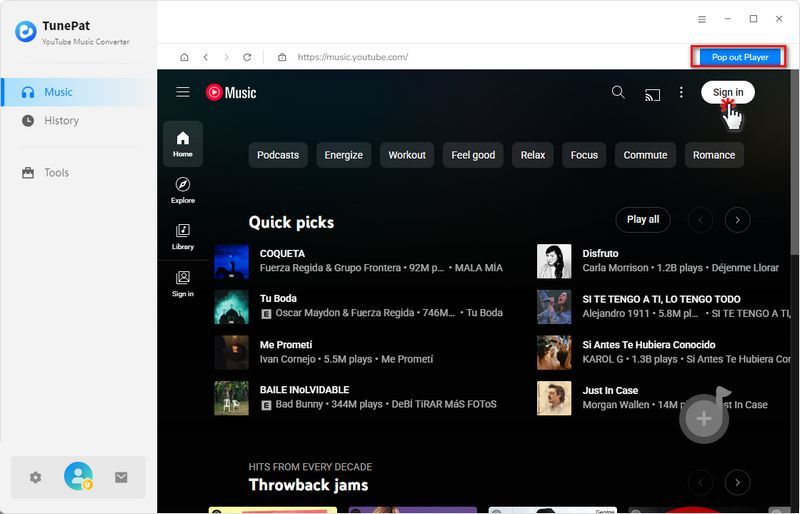
Step 1: Sign in
Launch TunePat YouTube Music Converter and click the 'Sign in' button in the upper right corner of the web player.
Step 2: Customize the Output Settings
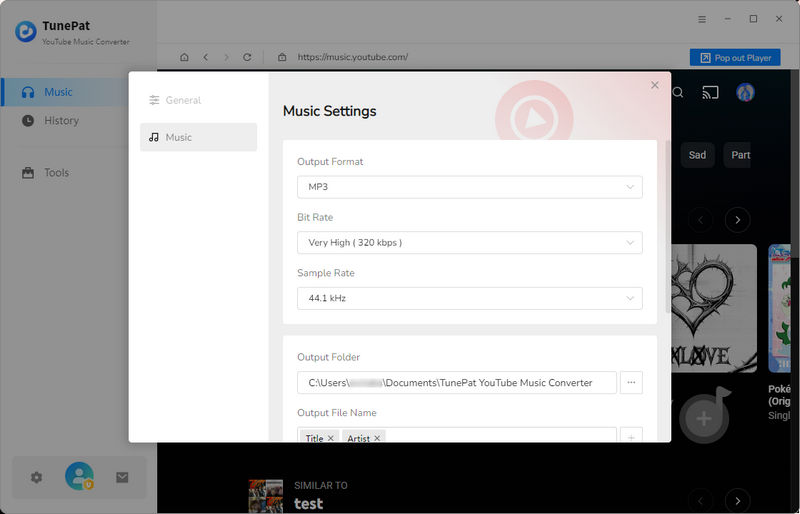
After logging in to your Premium account, click the "Settings option. Here you can customize the parameters, including output format (MP3, AAC, FLAC, WAV, AIFF, ALAC), bitrate, sample rate, output folder, output file name, etc.
Step 3: Add a Playlist
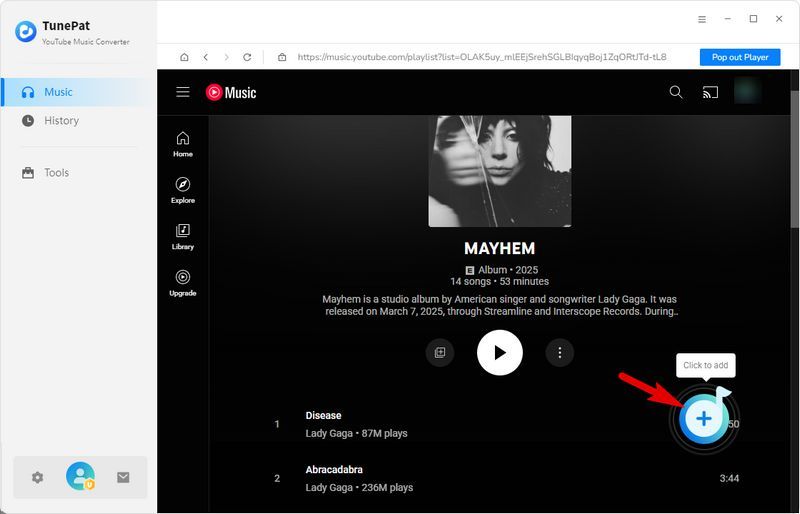
Go to the YouTube Music web player window and open a playlist you want to downlaod.
Then click the blue '+' button on the lower right-hand. This playlist will be immediately added to TunePat, and all available songs will be listed.
You can select all or tick off the ones you do not want, and click 'Add' to add them to the conversion queue.
Step 4: Download Playlist YouTube Music
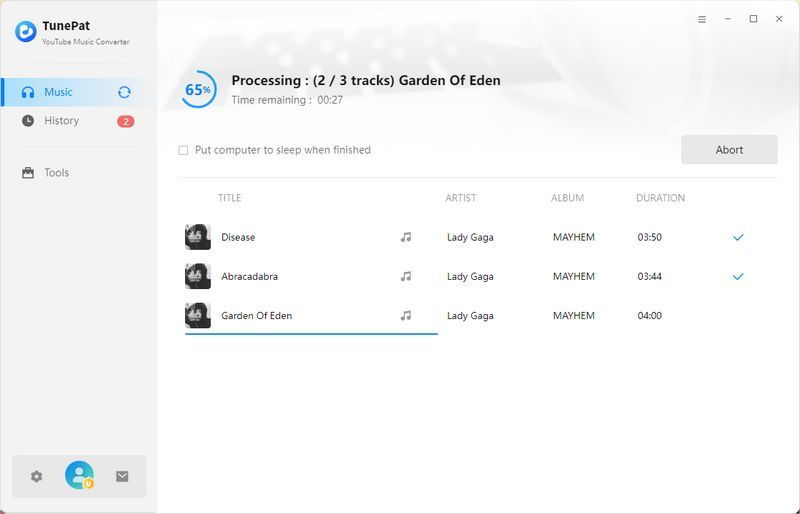
Click the 'Convert' button to start downloading the playlist of YouTube Music.
Part 3: FAQs about YouTube Playlist Download
Q1: Is downloading YouTube playlists legal?
Keep copyright in mind before you download anything from YouTube. Downloading copyrighted playlists or any content can violate YouTube’s Terms of Service and may be illegal in your region. Even when content is permitted, use it for personal purposes only and avoid redistributing or reposting it on any platform.
Q2: Are there free YouTube playlist downloaders?
Any Video Converter is a freeware that allows you to download YouTube playlists in your preferred quality, with no playlist-size limits. If you need more advanced features, you can also upgrade to a paid plan to unlock them.
Q3: How to download very large playlists (200–500 videos)?
Most desktop tools can handle large playlists reliably. The key differences are download speed and success rate. If you want the smoothest experience, especially for big playlists, Any Video Converter is the best choice for consistently high success rates, whether the full playlist fetching or downloading.
Q4: How to speed up slow playlist downloads?
Here are some common reasons that slow down the playlist downloads, and simple ways to speed them up.
Unstable internet
Online downloaders rely heavily on your connection. If your network is weak, speeds drop. For faster, steadier results, switch to a desktop downloader.
High configurations selected
Higher resolution, bitrate, and FPS require more bandwidth and time. Try lowering settings, for example, move from 8K/4K to HD, or reduce FPS from 120 to 60 or 30.
The playlist is too large
Playlists with 100+ items take longer to fetch and download. Save time by deselecting videos you don’t need. With Any Video Converter, you can also download specific items on demand.
Q5: How to keep the playlist organized?
Here are the important factors that help you keep playlist downloads tidy and easy to manage.
Create a subfolder for each playlist. A good downloader saves every playlist into its own folder, instead of mixing everything in one directory.
Auto-number each item. Adding numbers to filenames keeps files in the exact playlist order, so nothing gets shuffled.
Preserve metadata when available. Saved tags (like title, artist, and album) make it easier to sort and search your downloads afterward.
In summary, TunePat YouTube Music Converter can keep your playlist organized after downloading.
Final Thoughts
The 5 methods provided in this article allow you to save YouTube playlists and enjoy them on the go at any time. Among the solutions, Any Video Converter stands out due to its powerful download engine and versatility, and you can use it to download, convert, and edit videos with ease at an affordable price. Anyway, pick the most appropriate one to download entire playlists from YouTube at once.
Try Any Video Converter to Download YouTube Playlist for free!


Charlie Campbell | Content Writer
Charlie Campbell is an experienced technical documentation writer with a background in software development and a passion for emerging AI technologies. Dedicated to helping readers stay ahead in the fast-paced digital landscape, he combines technical expertise with clear communication to simplify complex topics and keep audiences informed on the latest advancements.